Baseball Star
- 4.3
- Rating
- 10.00M
- Installs
- Free
- Price

 Analysis by App-foxy
I went into Baseball Star expecting a simple sports game for short breaks, but its strongest identity is more specific: it is a full 3D baseball experience designed to remain playable without an internet connection. That makes it interesting for people who want a baseball game on a phone without depending on a signal, a login session, or a long setup before playing.
Developed by playus soft, this free sports game has been available since May 20, 2016. It has built a large audience, with more than 10 million installs, around 195 thousand ratings, and an average score of 4.3. Those figures do not automatically make it the right choice for everyone, but they do suggest that the basic formula has remained appealing to a substantial number of mobile players.
After spending time with it, my opinion is fairly clear: its best quality is convenience without sacrificing the feeling of a real baseball match. It is not the kind of game I would choose for a deeply simulated baseball-management experience, but it works well when I want something more substantial than a tiny arcade diversion and less demanding than a console-style sports title.
You May Also Like

 Google Keep - Notes and lists
Google Keep’s Quiet Growth Shows the Appeal of Simpler Notes
As mobile work gets busier, Google Keep keeps winning a simple contest: capture a thought quickly, find it later, and get on with the day.

 Blood Strike: 2.5 Anniversary
Blood Strike’s Loadouts Turn Every Drop Into a Tactical Gamble
A close look at Blood Strike’s custom loadouts: how fast access to signature weapons reshapes its battle royale rhythm, rewards preparation, and narrows the gap between fights.

 Pandora - Music & Podcasts
Pandora’s Music Is Easy to Start, but Harder to Recover
Pandora’s strength is its low-effort path from a seed to a station. Its weak spot is how much confidence it asks you to place in connection, setup, and quiet recovery.

 8 Ball Pool
 Is Built on Rivalries, Rematches, and Routine
A close look at the rivalries, rematches, shared routines, and unanswered safety questions that turn a quick pool match into a persistent mobile community.

 Samsung Music
’s Quiet Strength Is Playing What You Already Own
Its reach comes less from spectacle than from dependable access to a personal library. That simplicity is both the app’s strongest retention engine and its ceiling.

 AccuWeather: Weather Radar
AccuWeather Review: A Quick, Clear Forecast for Everyday Decisions
For everyday plans, the best forecast is the one you can understand quickly. AccuWeather makes rain timing, radar, and local conditions easy to act on, with a few trade-offs.
More From Our News Desk



What playing Baseball Star feels like on a phone
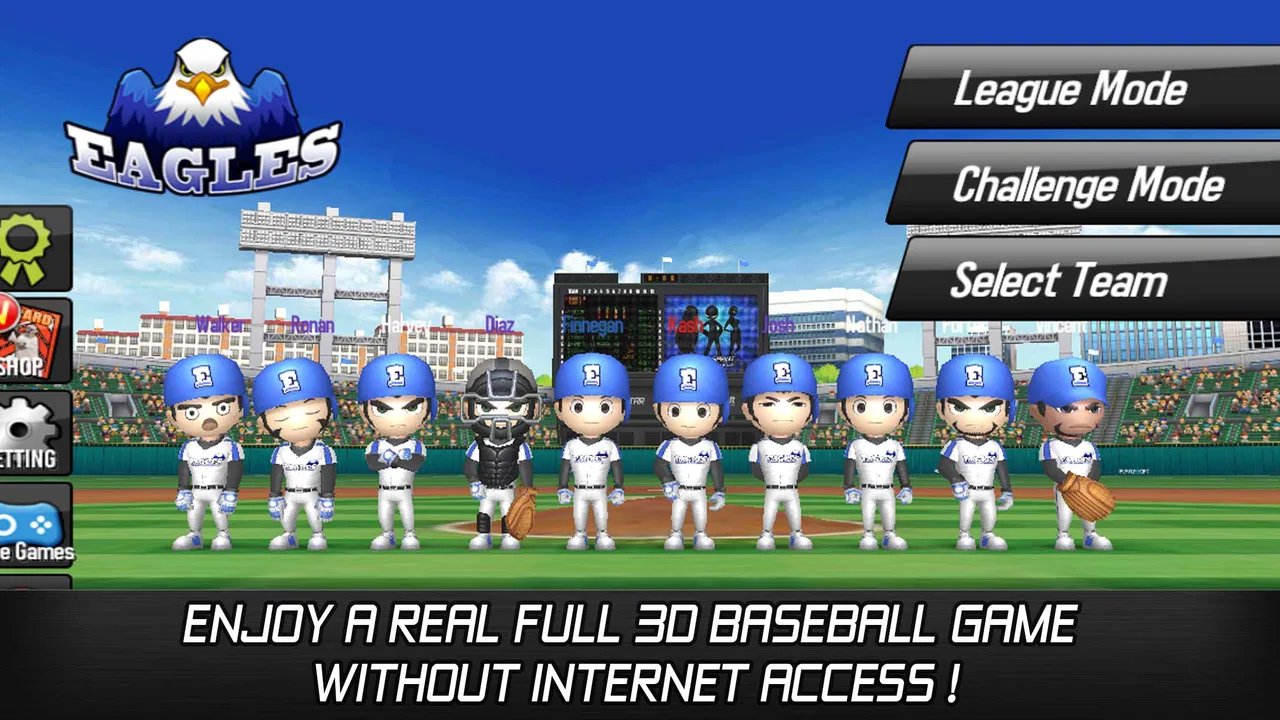
The first thing that stands out is the presentation. The game uses a full 3D view rather than reducing baseball to menus, cards, or a collection of disconnected mini-games. That gives each play more context: the pitch arrives in a proper stadium-like space, fielding has visual movement, and the action feels closer to a traditional baseball game than to a score-chasing tapper.
That visual approach also creates the main expectation you should have before installing it. This is not merely a baseball-themed puzzle game. You are choosing it because you want the sport represented as an actual game, with the rhythm of pitching, hitting, and reacting to what happens on the field. The result is more involving than a lightweight arcade title, even though it remains suitable for mobile sessions.
I especially liked the way the offline focus changes when and where the game makes sense. A train ride with unreliable reception, a waiting room, or a flight becomes a practical opportunity to play rather than a situation where the game is unusable. You can start it for a quick match, put the phone away, and return later without treating an internet connection as part of the basic requirement.
That does not mean every player will prefer this design. People who mainly want online competition, constant roster updates, or a social sports community may find the offline-first approach limiting. The game’s appeal is strongest when self-contained play is a benefit, not a compromise.
The controls reward timing more than frantic tapping
Baseball is naturally built around anticipation, and the mobile format works best when you approach it that way. I found that the experience is more enjoyable when I watched the delivery and reacted deliberately instead of tapping as quickly as possible. That makes a short session feel like a test of timing rather than a random exchange of button presses.
For a newcomer, this is useful because the basic idea is easy to understand: follow the play, make the important response, and learn from mistimed actions. At the same time, the simplicity does not remove all room for improvement. A player who pays attention to rhythm and placement can get more from the game than someone treating every moment as a reflex challenge.
My practical advice is to begin with a few relaxed sessions rather than judging the controls after one rushed attempt. Mobile sports games can feel awkward when the screen is crowded or when the player is trying to learn every action immediately. Here, patience helps reveal whether the timing-based style suits you.
The trade-off is that a phone screen cannot offer the same physical precision as a controller. If you are accustomed to console baseball games with many dedicated buttons and detailed manual control, this can feel simplified. That is not necessarily a flaw; it is the reason the game remains approachable on a touchscreen. Still, advanced players should not expect the same depth of input as a larger platform.
Why offline play changes the value proposition
The offline capability is more than a line in the description. It affects the entire ownership experience because it lets the game occupy a different place on your device. Instead of being an app you open only when the connection is strong, it becomes a dependable option for disconnected moments.
One realistic example is a long commute. I could play a few innings while traveling, stop when I reached my destination, and use the same game again later without planning around network availability. That is a better fit for mobile gaming than a title that assumes every session happens at home with stable service.
There is also a useful distinction between offline access and online features. Offline play is valuable for immediate entertainment, but it does not promise the changing world, live competition, or connected progression that some modern sports games emphasize. If your ideal baseball game is built around playing against real people at all times, this one may feel quiet.
For me, the absence of a connection requirement is a genuine strength because it removes friction. I would rather have a game that launches reliably for a solo session than one that offers more connected ambition but becomes inconvenient whenever reception drops.
Cost, purchases, and what you actually get
Baseball Star is free to access, so you can try its core experience without paying an entry price. That matters for a sports game because the right question is not simply whether it looks appealing, but whether its basic play is enjoyable before any optional spending becomes relevant.
The game includes in-app purchases ranging from $1.49 to $86.98 per item. That is a wide range, and it is the point where I would ask readers to be deliberate. Free installation makes experimentation easy, but the presence of paid items means the overall value depends on how comfortably you can ignore purchases or how much additional content and convenience you personally want.
I would not describe the game as automatically expensive, because the initial access is free and the purchase prices alone do not tell us how necessary any item is during normal play. I would also not describe it as completely cost-free in practice, because some players may be tempted by the available spending options. The fairest conclusion is that the free version should be judged on its own first.
My recommendation is simple: install it, play enough to understand the basic loop, and decide whether the unpurchased experience already gives you what you wanted. If it does, you have found a useful free baseball game. If it does not, spending more is unlikely to solve a mismatch between your preferred style and the game’s design.
This approach is particularly important for parents. The content rating is Everyone, which makes the game broadly suitable from a content perspective, but an age rating is not the same thing as a spending decision. If a child uses the device, I would still keep purchases under adult control and explain that free access and optional paid items are separate parts of the experience.
Where the game delivers good value
The strongest value comes from the combination of three things: a recognizable baseball structure, 3D presentation, and offline availability. Each element supports the others. The three-dimensional view gives the sport more presence, while offline access makes that presentation useful in places where many mobile games cannot be played.
It also offers a more focused alternative to broad sports packages. If I only want baseball, I do not need to spend time navigating unrelated sports or a large collection of modes that I will never use. That focus can be refreshing, especially when I have a few minutes and already know what kind of activity I want.
Compared with a basic baseball arcade game, this feels more like a complete sport-specific title. Compared with a large licensed console-style simulation, it is easier to pick up but less likely to satisfy someone who wants exhaustive control, deep realism, or a long-term management project. Its value sits between those extremes.
That middle position is important. The game is not trying to replace every baseball experience. It is better understood as a convenient mobile option for players who want recognizable on-field action without carrying a heavier, more demanding game around.
The limitations I noticed before recommending it
The age of the release is worth keeping in mind. A game first released in 2016 can still be enjoyable, but it may not match the visual polish, interface conventions, or breadth expected from newer sports games. I would choose it for its practical design rather than assuming it represents the latest standard in mobile baseball.
The offline focus is another limitation for a particular audience. If you want regular online opponents, live events, or a sense that the game world is constantly changing, you should look elsewhere. The same feature that makes it dependable during travel can make it feel less dynamic to someone who wants a connected service.
There is also a depth trade-off. A full 3D baseball game sounds substantial, but mobile controls still need to stay manageable. Players searching for detailed pitch selection, complex tactical decisions, extensive team administration, or highly granular player development should compare it with a dedicated simulation before settling here.
I would also avoid assuming that a strong average rating means universal satisfaction. The 4.3 average and large rating volume indicate broad approval, but baseball fans have very different expectations. A casual player may value quick offline matches, while a serious fan may judge the game by realism and strategic detail. Those two people can reasonably reach different conclusions.
Small habits that make sessions more enjoyable
First, use the offline nature intentionally. Rather than opening the game only at home, keep it in mind for situations where connectivity is uncertain. That is where its design has a practical advantage over many alternatives. A game that is merely adequate at home can become much more useful when it is available during a disconnected break.
Second, treat early sessions as a timing practice period. Do not immediately decide that a missed hit means the controls are poor. Watch how the action develops, make smaller and more deliberate inputs, and give yourself time to recognize the pace. This is a simple adjustment, but it changes the game from frustrating to readable for me.
Third, separate enjoyment from the purchase menu. Because the game is free to start and offers paid items, I would establish a personal rule before playing: either stay with the free experience or spend only when you can clearly explain what additional value you expect. That prevents a moment of impatience from deciding whether the game feels worthwhile.
Finally, compare it with your real use case rather than with the most powerful baseball game you have ever played. If you want a quick, self-contained sports game for a phone, its compromises may be sensible. If you want a serious simulation, comparing it only on graphics or the fact that it is free will lead to disappointment.
Who should install it, and who should skip it?
I think it is a good match for casual baseball fans, travelers, younger players, and anyone who values play without an internet connection. It is also suitable for people who want to test a sports game before committing money, since the initial access is free. The Everyone rating makes it an approachable choice for a broad audience, although purchase controls still deserve attention on shared devices.
It is especially appealing if your phone is your main gaming device and you prefer games that can be understood quickly. You do not need to organize a group of friends before starting a session, and you can use it in short blocks of free time. That makes it more practical than a game whose enjoyment depends on long uninterrupted matches.
I would skip it if online competition is the main reason you play sports games. I would also look elsewhere if you are searching for the deepest possible baseball simulation, a modern connected ecosystem, or a highly detailed team-management experience. Those priorities require a different type of product, even if that alternative is less convenient offline.
Players sensitive to older-looking presentation should try it with realistic expectations. The 3D format gives the game a proper sports identity, but the release era means it should be evaluated as an established mobile title rather than a brand-new visual showcase.
My final recommendation
Baseball Star earns my recommendation as a free, offline-friendly baseball game with a clear purpose. Its best use is not replacing every other sports title; it is giving me a straightforward way to play baseball on a phone when I want real on-field action without depending on an internet connection.
The purchase range means I would approach the game thoughtfully, beginning with the free experience and avoiding any assumption that spending is required. The main question is whether the controls, presentation, and level of depth match your expectations. For casual sessions, travel, and dependable solo play, the answer is likely yes.
For dedicated simulation fans and players who need online competition, I would recommend choosing a more specialized alternative instead. For everyone else, this is a sensible game to try: accessible, focused, and useful in situations where connected sports games are inconvenient. Its limitations are real, but they are closely tied to the same simplicity and offline convenience that make it appealing.
The current version is 1.7.9 and requires Android 6.0 or later. If your device meets that requirement and you want a no-cost way to sample full 3D baseball, I think it is worth giving the free version a fair session before deciding whether it belongs on your phone.
FAQs for Baseball Star
01What is Baseball Star?
Baseball Star is a mobile sports game available on both Android and iOS platforms. It allows players to manage and play their own baseball team, offering both single-player and multiplayer modes. The game features realistic graphics and gameplay, making it a favorite for baseball enthusiasts.
02Is Baseball Star free to play?
Yes, Baseball Star is free to download and play. However, it does offer in-app purchases that can enhance the gaming experience. These purchases typically include items like power-ups, special gear, or currency to expedite progress. Players can enjoy the game without spending money, but purchasing can offer advantages.
03What are the main features of Baseball Star?
Baseball Star includes a variety of features, such as a team management system, realistic player animations, and strategic gameplay. Players can customize their teams, engage in leagues, and compete in both online and offline modes. The game also offers seasonal events and updates to keep the content fresh and engaging.
04Does Baseball Star require an internet connection?
Baseball Star can be played both online and offline. While an internet connection is not required for single-player modes, accessing multiplayer features, updates, and certain events will need an internet connection. This flexibility makes it convenient for users who may not always have internet access.
05How does the multiplayer mode work in Baseball Star?
In multiplayer mode, Baseball Star allows players to compete against others from around the world. The game uses a matchmaking system to pair players with similar skill levels, ensuring fair and competitive gameplay. Players can earn rewards and climb leaderboards, adding an exciting competitive edge to the game.
Pros
- Smooth and intuitive gameplay mechanics.
- Impressive graphics with vibrant animations.
- Customizable teams and players.
- Offline mode available for gameplay anywhere.
- Regular updates with new features.
Cons
- In-app purchases can be pricey.
- Occasional lag on older devices.
- Limited multiplayer options.
- Repetitive after extended play.
- Requires significant storage space.

Baseball Star
Gallery